当接口写完需要测试时,我们可以在接口文档或者用postman单独调用某个接口来进行测试。postman+javascript 的方式,一种是python 的方式。单独用javascript的方式可以通过第一种方式类推一下。
问题:接口A返回内容,给接口B循环调用 我先来介绍一下手动执行的方法。
对于获取部门的接口A:http://localhost:8095/unit,需要请求头和请求体如下。
1 2 3 4 5 6 7 8 Authorization: xxx { "area" : null , "userId" : 702 }
然后获取的数据如下
1
2
3
4
5
6
7
8
9
{ "code" : 200 , "msg" : "请求成功" , "data" : [ "AS-M" , "AD-H" , …… ] }
对于上面获取的数据的data就是我接口B根据部门获取相应数据的其中一个参数combatUnit,而接口B每次只能接收一个,所以要多次调用:http://localhost:8095/areaData。该接口的请求头和请求体如下:
1 2 3 4 5 6 7 8 9 10 11 12 Authorization: xxx { "attribute1" : "" , "businessTab" : "" , "combatUnit" : "AS-M" , "region" : "" , "role" : "4" , "subsidiary" : "" }
这时,B中的参数要一个个放入combatUnit中调用,返回结果如下。对于有些部门调用接口B的时候会出现其中的list为null的情况,我要找出这些部门。
1
2
3
4
5
6
7
8
9
10
11
12
13
14
{ "code" : 200 , "msg" : "请求成功" , "data" : { "list" : [ { "area" : "中东" , "point" : "[54.458379258595116, 24.388822399734615]" , "color" : "#00B87A" } ] , "centerPoint" : "[81.106187,6.629154]" } }
如果一个个调用接口B,几百次调用对于手动来说不仅慢还易错,因此就需要使用脚本来测试。
一. postman+javascript 在postman配置一个接口中有一个Scripts,点进去后有个Post-response我们可以把内容写在这里。当我们对此接口send的时候,在这边的脚本就会执行。
这个脚本中用的是javascripts脚本,在当前调用pm.response可以调取到当前接口的返回值。上面说了接口A返回的值形如
1
2
3
4
5
6
7
8
9
{ "code" : 200 , "msg" : "请求成功" , "data" : [ "AS-M" , "AD-H" , …… ] }
因此可以用pm.response.json().data获取整个数组,当然这个脚本得在接口A的Scripts中编写才能获得到数据。data.list字段是否为空。完整js如下:
1 2 3 4 5 6 7 8 9 10 11 12 13 14 15 16 17 18 19 20 21 22 23 24 25 26 27 28 29 30 31 32 33 34 35 36 37 38 39 40 41 42 43 44 const aData = pm.response .json ().data ; aData.push ("ccc-T" ) const headers = { 'Content-Type' : 'application/json' , 'authorization' : 'xxx' }; aData.forEach (item => const cu = item; if (!cu) return ; const body = { attribute1 : '' , businessTab : '' , combatUnit : cu, region : '' , role : '4' , subsidiary : '' }; pm.sendRequest ({ url : 'http://localhost:8095/areaData' , method : 'POST' , header : headers, body : { mode : 'raw' , raw : JSON .stringify (body) } }, (err, res ) => { if (err) { console .error ('请求失败' , cu, err); return ; } const json = res.json (); if (!json.data || !json.data .list || json.data .list .length === 0 ) { console .log (`⚠️ ${cu} 返回 list 为 null/空` ); } }); });
然后因为上面全部测试都是有list的,所以我加了一个aData.**push**("ccc-T"),这个数据绝对是没有的,所以send这个接口以后,可以再左下角的Console中看到:
二. Python-单线程 python作为一门编程语言,在写脚本上有其独特的优势,具体过程和javascript在postman中是一样的,但是区别在于接口A需要自己调用一下,区别也不大。
python中的网络编程可以使用requests包,没有的话可以pip install requests下载一下。具体代码如下:
1
2
3
4
5
6
7
8
9
10
11
12
13
14
15
16
17
18
19
20
21
22
23
24
25
26
27
28
29
30
31
32
33
34
35
36
37
38
39
40
41
42
43
44
45
46
47
48
49
50
51
52
53
54
55
56
import requestsimport jsonheaders = { "Content-Type" : "application/json" , "authorization" : "xxx" } body_first = { "area" : None , "userId" : 702 } url_first = "http://localhost:8095/unit" a_data = ["nothing" ] try : resp = requests.post(url_first, headers=headers, data=json.dumps(body_first), timeout=5 ) resp.raise_for_status() a_data = resp.json() if a_data: a_data = a_data.get("data" ,{}) except requests.RequestException as e: print ("请求失败" , e) a_data.append("ccc-T" ) url = "http://localhost:8095/areaData" for item in a_data: cu = item.get("combatUnit" ) if isinstance (item, dict ) else item if not cu: continue body = { "attribute1" : "" , "businessTab" : "" , "combatUnit" : cu, "region" : "" , "role" : "4" , "subsidiary" : "" } try : resp = requests.post(url, headers=headers, data=json.dumps(body), timeout=5 ) resp.raise_for_status() data = resp.json() if not data.get("data" , {}).get("list" ): print (f"⚠️ {cu} 返回 list 为 null/空" ) else : print (f"{cu} 查询成功" ) except requests.RequestException as e: print ("请求失败" , cu, e)
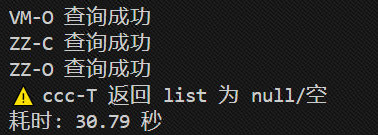
最终查询结果如下。
三. Python-多线程 上面python写完后我发现,这个访问实在是慢,postman只要6s,但这python要30s,这能忍?那不得搞个多线程访问一下?
首先先说明一下,我们可以用以下代码计算时间:
1
2
3
4
5
6
import timestart = time.time() end = time.time() print (f"耗时: {end - start:.2 f} 秒" )
多线程所用的包concurrent.futures是原生python自带的,因此不需要pip。注意代码中的等待时间可以稍微设置长一点timeout=15,我之前5s,结果老有现成执行不完。
完整的多线程代码如下:
1
2
3
4
5
6
7
8
9
10
11
12
13
14
15
16
17
18
19
20
21
22
23
24
25
26
27
28
29
30
31
32
33
34
35
36
37
38
39
40
41
42
43
44
45
46
47
48
49
50
51
52
53
54
55
56
57
58
59
60
61
62
63
64
65
66
67
68
import requestsimport jsonfrom concurrent.futures import ThreadPoolExecutor, as_completedimport timestart = time.time() MAX_WORKERS = 8 headers = { "Content-Type" : "application/json" , "authorization" : "xxx" } def query_one (combat_unit: str ): """单个 combatUnit 的请求逻辑""" body = { "attribute1" : "" , "businessTab" : "" , "combatUnit" : combat_unit, "region" : "" , "role" : "4" , "subsidiary" : "" } try : r = requests.post( "http://localhost:8095/areaData" , headers=headers, data=json.dumps(body), timeout=15 ) r.raise_for_status() data = r.json() if not data.get("data" , {}).get("list" ): return f"⚠️ {combat_unit} 返回 list 为 null/空" else : return f"{combat_unit} 查询成功" except Exception as e: return f"请求失败 {combat_unit} {e} " body_first = {"area" : None , "userId" : 702 } resp = requests.post( "http://localhost:8095/unit" , headers=headers, data=json.dumps(body_first), timeout=5 ) resp.raise_for_status() a_data = resp.json().get("data" , []) a_data.append("ccc-T" ) units = [ (item.get("combatUnit" ) if isinstance (item, dict ) else item) for item in a_data if item ] with ThreadPoolExecutor(max_workers=MAX_WORKERS) as pool: futures = [pool.submit(query_one, u) for u in units if u] for fut in as_completed(futures): print (fut.result()) end = time.time() print (f"耗时: {end - start:.2 f} 秒" )
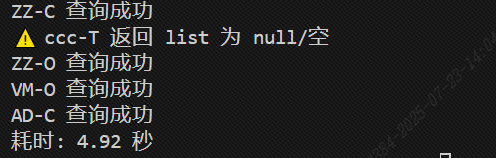
最终结果如下:
这样子就能很快的运行了,如果把MAX_WORKERS调大,在我的计算机上可以到20为止,都是上涨的,可以在2.5s左右就运行完,具体得看电脑配置。
四. 总结 Postman 的脚本之所以 6 s 左右就跑完,而 Python 却要 30 s,本质差异在于并发 。
Postmanpm.sendRequest() 是 异步非阻塞 的:
Python-单线程串行阻塞 的 requests.post(...):阻塞 在原地等服务器返回,
结论:Python 没有并发,请求依次排队,于是总耗时=单条耗时×条数 。